Today: check-in, to-dos, recovery and sleep
Today is where each day starts: how you've recovered and slept, what your coach said, what's on your list and what you've done. This page walks through the screen from top to bottom.
Updated:
Today is the first tab. Pull down on it to sync Apple Health, send changes that are waiting and reload the screen. Recovery, sleep and energy come from Apple Health, so they fill in once it’s connected and your watch has recorded a night.
1. How you are: the four cells
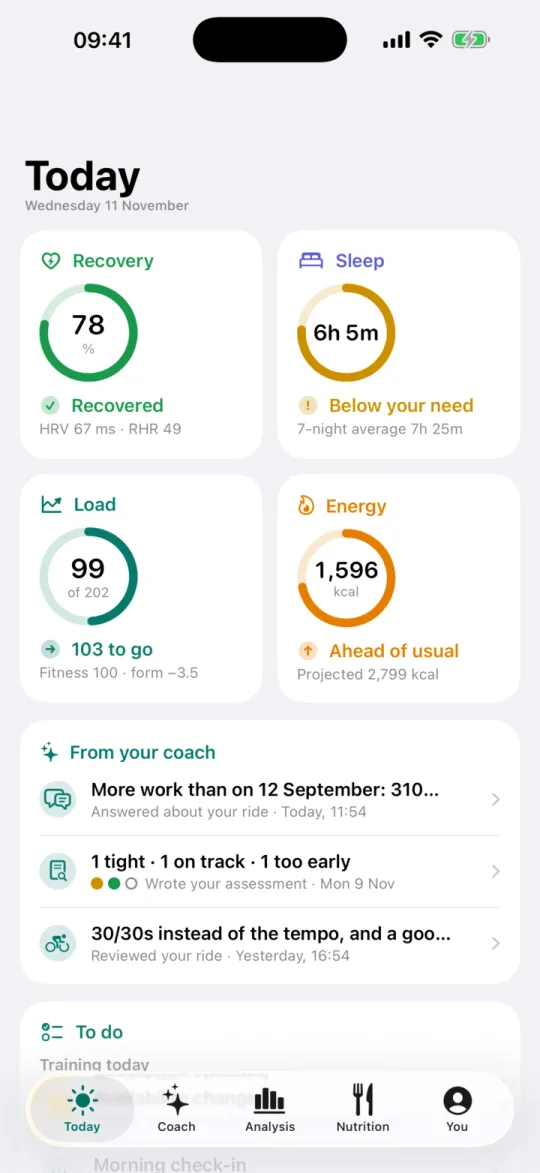
At the top, four cells show your day at a glance. Tap one for its details.
- Recovery: last night’s heart-rate variability (HRV) and resting heart rate against your own usual, as a score with Recovered, Watch it or Go easy. In your first weeks it says Building your baseline and counts up to 21 nights.
- Sleep: last night’s sleep against your sleep need, with the 7-night average.
- Load: today’s training load against what’s planned. On a day with no plan and no workout, it shows the week so far.
- Energy: the energy you’ve burned so far against your usual pace for the time of day.
What the scores mean and why they steer your day: recovery and sleep and training load.
Injuries and illness: while an injury, illness or pain in your log is active, a card under the four cells lists it with how long you’ve had it and whether training is reduced or paused. Tap one to open it:
- Ask my coach opens a question to your coach about this entry, with its latest updates.
- Updates: note how it’s going, for example “Easy run felt fine, stairs still sore”. The day is today unless you pick an earlier one. Tap Add update; swipe one to the left (on the Mac, right-click it) to delete it. Your coach reads your latest updates when it plans.
- Mark as resolved when it’s over. Mitovo then asks Adjust your plan now?. An entry resolved today stays on the card until tomorrow.
- Edit changes the entry itself. The same page opens from You › Health › Injuries and illness; more in health records.
2. The morning check-in
Each day starts with the Morning check-in under To do. It stays there until you answer it.
- Tap Morning check-in.
- Answer Unusually fatigued today? with No or Yes, and Ill or injured? with No, Ill or Injured.
- Tap Done.
If you pick Ill or Injured, Mitovo opens your injury log so you can note what it is (or confirm that an ongoing entry is unchanged). After you save it, Mitovo asks Adjust your plan now?: Adjust my plan… has your coach change the coming days around it; Later leaves the choice on Today. How the log works: health records.
If you’re unusually tired and a session is still open today, To do shows You feel unusually tired. It can offer Make today easy (an easier day) and always offers Ask your coach to ease the next three days.
3. Your to-dos
To do lists everything for today, grouped once there’s more than one kind: Training today, Asked by your coach, and Logging and habits.
- Your sessions for today, with length, intensity and fuelling notes. Tap one to open it and start it, or to move or change it.
- Plan reviews: a change from your coach waiting for your decision, and on Sundays your next two weeks (weekly planning).
- Asked by your coach: suggestions, fitness tests and to-dos from your coach. Every row is one line; tap a to-do from your coach to read why it matters, with its buttons. Tap Done when you’ve done one, or Answer when it asks you something: that opens the to-do’s own conversation with your coach, and the to-do ticks off once your coach has your answer.
- Logging and habits: for example Log yesterday’s food in the morning, Log today’s food in the evening (nutrition), or Weigh yourself.
Not today, or not at all: swipe a to-do to the left (on the Mac, or anywhere: touch and hold it, or right-click). Daily ones, like today’s session, a food row, a fuelling note, the check-in or the weigh-in, say Not today and come back when they’re due again. One-offs, like a to-do from your coach, a skipped session, a test, a doctor’s visit or a setup step, say Dismiss and stay gone. Undo brings it back for a few seconds. What you decide on stays: a plan change, a suggestion from your coach, a nutrition change, the season setup and the weekly planning. Your iPhone and your Mac show the same list.
Things you don’t do at all: under You › App › To-dos & notifications, What Mitovo asks of you lists weigh-ins, food logging, the morning check-in, fuelling notes, fitness tests and setup reminders. Switch one off and Mitovo stops asking for it: no to-do, no notification, and your coach doesn’t ask for it either. The notifications below it are the reminders for what you do want.
When everything is done, Today says All done for today and what’s planned for tomorrow.
From your coach: when your coach has written to you, From your coach shows the unread messages above To do. Tap one to read it. A new assessment is one line with a dot per goal, like “1 tight · 1 on track”.
4. Done today and starting a session
Done today lists the workouts you’ve recorded today. Tap one to see its details.
Start a session at the bottom starts something right away: Breathe, Meditate, Strength and Ride, plus Run, Swim or Hyrox depending on your focus and goals. Tap Edit to choose which rows show, or Use the default to go back to the standard list. More on each: strength sessions, ride mode, breathing and meditation.
5. Recovery and sleep in detail
Tap Recovery to see your score, your HRV and resting heart rate against your usual, and charts of the score, HRV and resting heart rate over 7 days to 6 months. The ⓘ button explains how the score works.
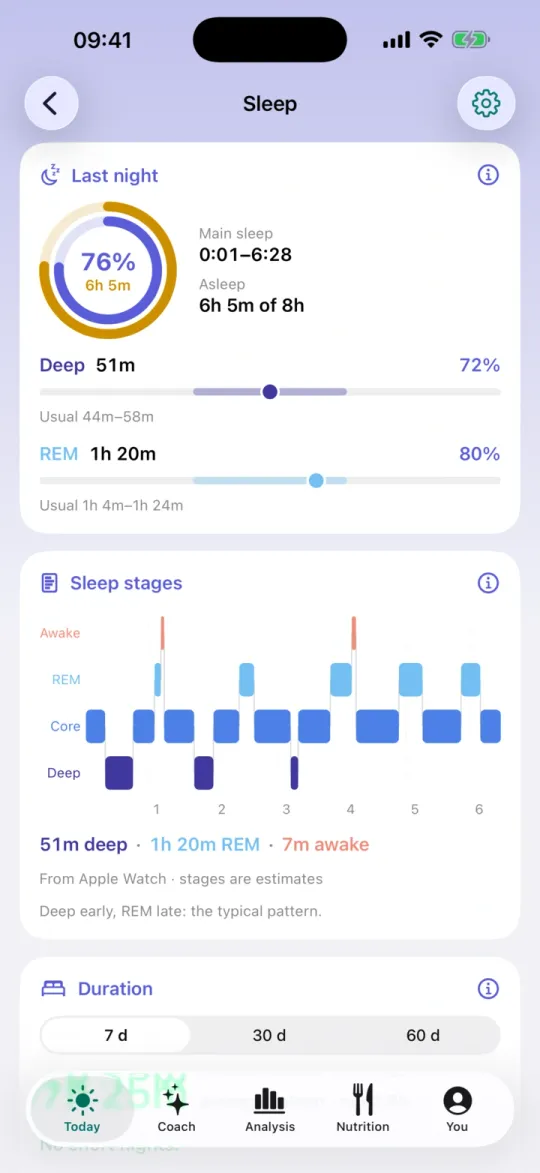
Tap Sleep to see Last night (time asleep against your need and, after 14 nights with sleep stages, a sleep score), Sleep stages, Duration, Sleep timing consistency, and Deep and REM sleep. The last three switch between 7, 30 and 60 nights.
The gear on the sleep page opens your sleep settings (also under You › Health › Sleep):
- Sleep need: the default is 8 hours; set your own between 5 and 12 hours.
- Sleep source: Automatic, or the one device you want Mitovo to read sleep from if you wear more than one.
Offline: Today shows what it stored last. The check-in, starting a session and logging still work and are sent when you’re back online; actions that need your coach are greyed out with Needs a connection.
Questions
Why doesn't Mitovo show a recovery score yet?
Mitovo compares last night's heart-rate variability and resting heart rate with your own usual, and it needs 21 nights for that. Until then the Recovery cell says Building your baseline with a count. Wear your watch to bed so the nights reach Apple Health.
What does the morning check-in do?
It asks two questions: whether you're unusually fatigued today, and whether you're ill or injured. If you're ill or injured, Mitovo opens the injury log and offers to have your coach adjust your plan. If you're unusually tired and a session is still open today, Today offers an easier day, or to have your coach ease the next three days.