Mitovo Ride: indoor rides, played
Mitovo comes with its own ride app. Your coach's bike sessions run on your smart trainer at home or on a bike at the gym, on your iPhone or your Mac, with no second app to set up.
Updated:
Two ways to ride: game mode or ERG
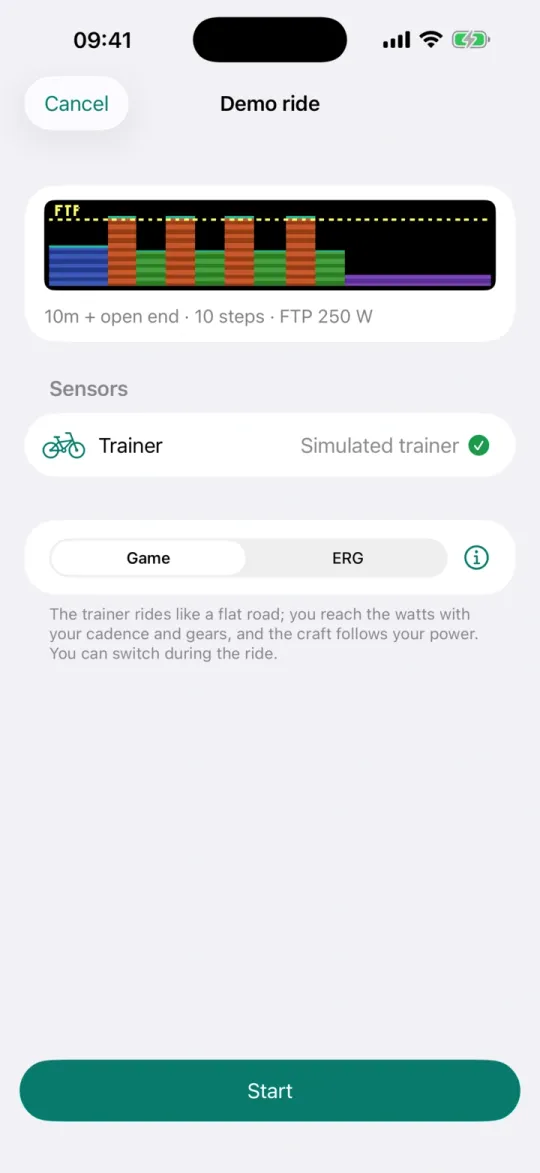
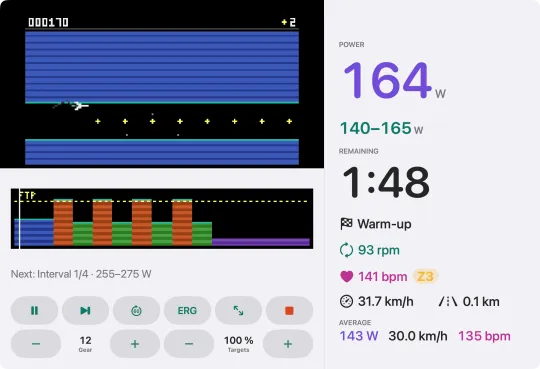
Every ride is a small retro game. A pixel craft flies through a corridor whose height is your target. The workout’s steps are the level, so you see the next interval coming before it starts. Stay inside the corridor to score, collect coins and build a streak multiplier.
- Game mode (the default): the trainer rides like a flat road and you reach the target watts yourself, with your cadence and your gears. The craft follows your power. On a trainer Mitovo controls, you shift through 24 virtual gears, each one a little steeper or flatter.
- ERG mode: the trainer holds the watts, whatever your cadence. The craft then follows your cadence, in a band of 80 to 95 rpm.
Heart-rate steps get a wider, slower corridor. With Reduce Motion on, a plain chart replaces the game. The numbers stay outside the game in plain type, readable from the saddle: power, target, time left, step, cadence, heart rate with its zone, speed and distance.
At home: smart trainers
Mitovo Ride works with smart trainers that speak FTMS, the standard Bluetooth protocol for fitness machines, which most trainers made since about 2020 support. Mitovo takes control of the trainer, sets the ERG watts or the gradient, and reads power, cadence and speed from it.
- Power meter: if you pair one, Mitovo uses its power instead of the trainer’s.
- Heart rate: from a chest strap, or on the iPhone from your Apple Watch, which Mitovo starts for you when no strap is paired.
- One app at a time: only one app can control a trainer, so close other trainer apps first.
At the gym: gym bikes
Mitovo also reads gym bikes it can’t control. You set the resistance on the bike, Mitovo reads your power and cadence, and the ride runs in game mode. Your trainer at home stays paired for the next ride there.
- Bikes with standard Bluetooth: any bike that sends standard Bluetooth bike or power data, for example the Wattbike Pro and Trainer, the Stages SC3, ICG and Life Fitness bikes with the WattRate TFT 2.0 console (2020 or later) and the Concept2 BikeErg.
- Keiser M Series: the M3i, M3i-TBT and M5 broadcast their data instead of taking a connection. Mitovo lists them by the number on the console, such as “Keiser bike 38”. Keep Mitovo on screen during a Keiser ride: the bike’s broadcasts don’t reach an app in the background.
- Finding your bike: gyms often have rows of bikes with the same Bluetooth name. Mitovo lists the bikes nearby with their signal, nearest first. Pick one and Mitovo shows its live watts and cadence and asks whether the bike’s display shows the same. Say yes and Mitovo remembers the bike under a name you choose, like “Bike 8”.
- Not possible: bikes that only speak ANT+ (an iPhone has no ANT+ radio) and bikes with a closed connection.
What you can ride
- Your coach’s bike sessions: tap “Ride it” on a planned session. The ride is linked to the session, so your coach knows you did it.
- 14 classic workouts, from a recovery spin and long endurance rides to tempo, sweet spot, threshold, over-unders, VO₂max intervals, 30/30s and sprints, each with what it trains and cues for riding it.
- Your own workouts, built in the workout editor or by your coach when you ask for one.
- A free ride: ride with the gears, or switch ERG on and hold any wattage from 50 to 1,000 W.
- FTP tests: the 20-minute test and the ramp test. After the test, Mitovo offers you the new FTP (see how zones and tests work).
Rides start from Today › Start a session › Ride. Power targets come from your FTP; without an FTP the steps have no watt targets and Mitovo asks for one. During the ride you can pause, skip a step (Mitovo asks first), add a minute, make the targets 5 % harder or easier, and switch ERG on or off. When you stop pedalling, the ride pauses by itself.
Every ride saved
- Every second recorded: power, cadence, heart rate, speed and distance, saved as you ride, so a crash or a closed app loses nothing. On the iPhone it keeps recording with the screen locked.
- In Mitovo: the ride goes to your training history with power and heart rate, and your coach plans with it. Offline, it waits and goes up the next time you open Mitovo.
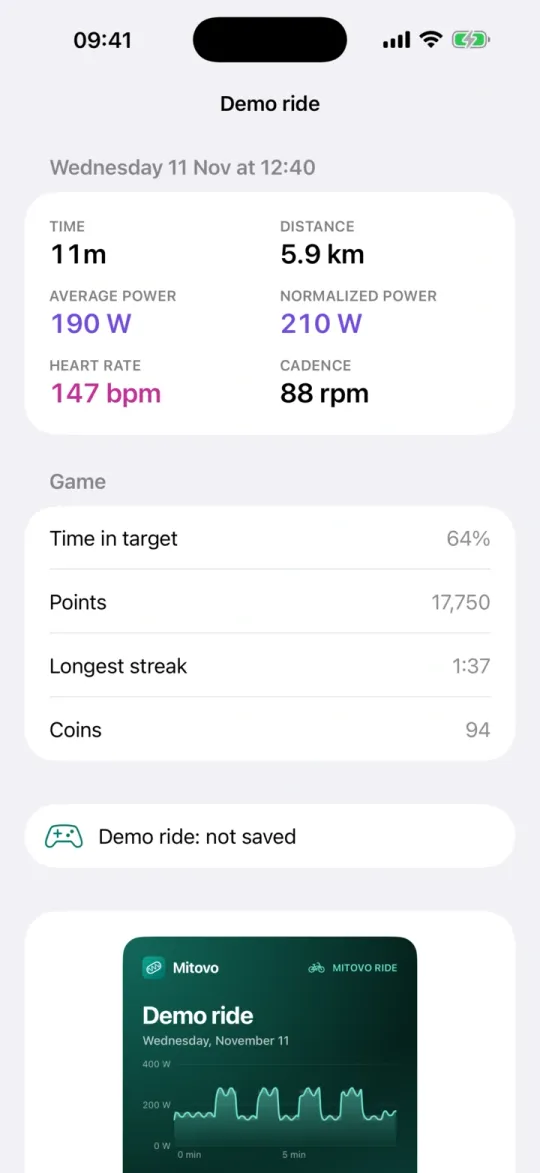
- The summary: time, distance, average and normalized power, heart rate, cadence, time in target, score, longest streak and coins.
- Apple Health: the iPhone writes the ride to Apple Health as indoor cycling, with heart rate, power, cadence, speed, distance and active energy, so the Fitness app counts it. Rides from the Mac reach Apple Health through your iPhone.
- FIT file: “Save .fit” gives you the ride as a FIT file for any other app.
- Share image: the summary makes a picture of the ride (the power over the ride, time, average power, time in target and points, and mitovo.app) to post on Strava, Instagram or anywhere. No heart rate or other health values on it.
- Strava: connect Strava once (You › Connections › Strava), and while Send rides to Strava is on there, every ride from Mitovo Ride goes to your Strava by itself, as a virtual ride named after the session, with a line about Mitovo Ride. Only rides from Mitovo Ride are sent, never imported files or Apple Health workouts. Mitovo never reads anything from Strava. Disconnect any time; rides already on Strava stay there.
On your iPhone and your Mac
Mitovo Ride is the same on both. On the iPhone a ride opens full screen. On the Mac it fills the window and can go full screen; on a wide screen the numbers get their own column and grow with the space.
On the Mac, the keyboard runs the ride: space pauses, → skips to the next step (press twice), M adds a minute, ↑ and ↓ change the targets, and the comma and full stop keys shift gears. The Mac has no Apple Health, so heart rate comes from a chest strap, and your iPhone adds the Mac’s rides to Apple Health. One subscription covers both. What else the Mac app does, from the coach and the plan to analysis and file drops: Mitovo for Mac.
Questions
Which smart trainers work with Mitovo Ride?
Smart trainers with the standard Bluetooth fitness machine service (FTMS), which most trainers made since about 2020 have. Mitovo connects over Bluetooth; trainers that only speak ANT+ don't work, because an iPhone has no ANT+ radio.
Only one app can control a trainer at a time, so close other trainer apps before you ride.
Which gym bikes work?
Many gym bikes with standard Bluetooth, and the Keiser M Series (M3i, M3i-TBT and M5). Mitovo reads any bike that sends standard Bluetooth bike or power data, for example the Wattbike Pro and Trainer, the Stages SC3, ICG and Life Fitness bikes with the WattRate TFT 2.0 console (2020 or later) and the Concept2 BikeErg.
On a gym bike Mitovo reads your power and cadence; you set the resistance on the bike. That's why gym-bike rides use game mode, not ERG.
Do I need a subscription for Mitovo Ride?
Mitovo Ride is part of Mitovo, not a separate app or purchase, and one subscription covers iPhone and Mac. Once Mitovo is on the App Store, you can try it free for 14 days; after that it's €19.99 a month or €179.99 a year. Cancel during the trial and you pay nothing.
Do I need a power meter or a heart-rate strap?
No. Your smart trainer or gym bike measures power. If you pair a power meter, Mitovo uses it instead. For heart rate, pair a chest strap, or on the iPhone wear your Apple Watch: without a strap, Mitovo starts on the watch and takes its heart rate.
Can I ride with Mitovo on a Mac?
Yes. The Mac app rides the same sessions with the same trainers and gym bikes, over the Mac's Bluetooth. It has keyboard shortcuts for the controls, and the ride can fill the screen. Heart rate on the Mac comes from a chest strap.
Does Mitovo Ride upload to Strava?
Yes, if you connect Strava in the app. While Send rides to Strava is on (it is when you connect), every ride from Mitovo Ride goes to your Strava by itself, as a virtual ride. Mitovo only sends rides; it never reads anything from Strava.