Mitovo for Mac: your coach at the desk
Mitovo is a native Mac app too: the same app, the same account and the same data as on your iPhone. Ride full screen next to your trainer, read your analysis on a big screen and write to your coach on a real keyboard. One subscription covers both.
Updated:
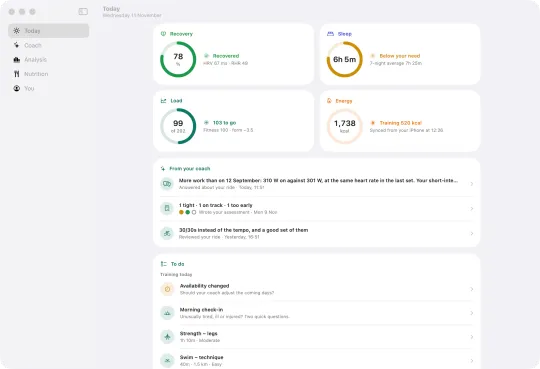
The whole app, in a Mac window
Mitovo on the Mac isn’t a cut-down companion or a web page. It’s the same app as on your iPhone, built from the same code and signed in to the same account, so your goals, plan, sessions, coach messages and food log are the same on both.
- A sidebar instead of tabs: the iPhone’s five tabs, Today, Coach, Analysis, Nutrition and You, sit in a sidebar. ⌘1 to ⌘5 switch between them.
- The iPhone’s screens, in a readable column in the middle of the window. What opens full screen on the iPhone opens as a sheet on the Mac.
- Without internet it works like the iPhone app: it opens, shows what it loaded last and keeps what you log until it’s back online.
Ride on the Mac
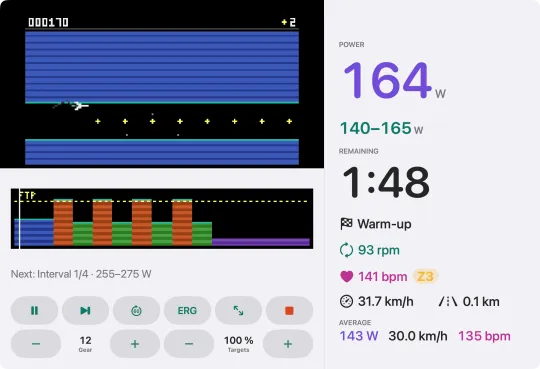
Mitovo Ride runs on the Mac with the same sessions, the same smart trainers and the same gym bikes, over the Mac’s Bluetooth. Start a ride from Today › Start a session, as on the iPhone; ⌘R opens that ride page from anywhere in the app.
- Full screen: a ride covers the whole window and can go full screen. On a wide screen the numbers sit in their own column and grow with the space, readable from the saddle.
- The keyboard runs the ride: space pauses, → skips to the next step (press twice), M adds a minute, ↑ and ↓ make the targets harder or easier, and the comma and full stop keys shift gears.
- Zwift Ride controllers pair with the Mac too, with the same buttons as on the iPhone.
- Heart rate comes from a chest strap.
Game mode and ERG, trainers, gym bikes, what you can ride and where your rides go: all on the Ride page.
Working at the desk
The Mac is where you have the time and the screen to read your data and think about your plan.
- Your coach on a keyboard: File › New Coach Request (⌘N) opens a request to your coach from anywhere in the app. Long questions and changes to your week are easier to type at a desk.
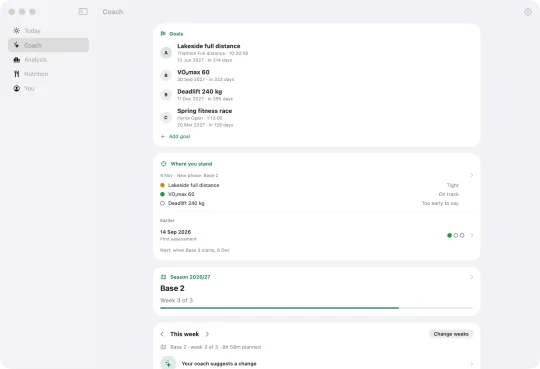
- Your plan: the Coach tab shows your goals, where you stand on each, your season and this week’s sessions.
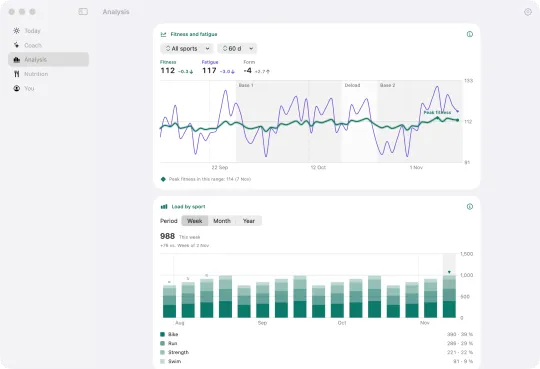
- Your analysis: fitness and fatigue, load by sport and the rest of the Analysis tab, on a big screen.
- Energy: the Energy tile shows what your iPhone synced, with “Synced from your iPhone at …”: what you burned so far with its training part, and in the detail the split into everyday and training energy, food eaten, the balance and the past 7 days.
- Drop files on the window: FIT files,
.fit.gzfiles and ZIPs (for example Garmin’s or Strava’s account export) go straight into the workout import; PDFs and photos open the document upload. File › Import FIT Files… (⇧⌘I) and Upload Document… (⇧⌘U) do the same from the menu, and Finder’s “Open With” offers Mitovo for FIT files and ZIPs.
What the Mac doesn’t do, and why your iPhone stays the data source
A few things need an iPhone, so they stay there:
- Apple Health: the Mac has no Apple Health. It shows what your iPhone synced and never syncs itself. Your sleep, heart rate, HRV and workouts from your watch reach Mitovo through the iPhone app, so keep Mitovo on your iPhone.
- Camera scanners: scanning documents, barcodes and nutrition labels needs the iPhone’s camera. On the Mac you add a document as a PDF or a photo file and type a barcode’s number instead.
- Notifications arrive on your iPhone, not on the Mac.
- Strength sessions on the go: you log your sets on the Mac too, but the bar that keeps a session in progress at hand, the rest timer on the Lock Screen and logging on your watch are the iPhone’s.
- The Apple Watch pairs with your iPhone: sessions on your watch and heart rate from it during a ride go through the iPhone.
What you need
- A Mac with macOS 26 or later.
- An iPhone with Mitovo for your Apple Health data.
- For rides: the Mac’s Bluetooth, a smart trainer with FTMS or a gym bike Mitovo can read, and a chest strap if you want heart rate.
- One Mitovo subscription for iPhone and Mac. Mitovo is coming soon to the App Store; there’s no separate download for the Mac.
Questions
Is there a Mac app of Mitovo?
Yes. Mitovo is a native Mac app, built from the same code as the iPhone app, and it comes to the App Store together with the iPhone app, soon. There's no separate download from this website.
Do I need a second subscription for the Mac?
No. The iPhone and Mac apps are one purchase on the App Store, so one subscription covers both. Once Mitovo is on the App Store, you can try it free for 14 days; after that it's €19.99 a month or €179.99 a year. Cancel during the trial and you pay nothing.
Can I use Mitovo on a Mac without an iPhone?
Not for your health data. The Mac has no Apple Health, so your sleep, heart rate, HRV and workouts reach Mitovo through the app on your iPhone, and the Mac shows what your iPhone synced. Keep Mitovo on your iPhone and use the Mac next to it.
Which Macs does Mitovo run on?
Macs with macOS 26 or later. For indoor rides Mitovo uses the Mac's Bluetooth to connect to your trainer or gym bike.
Can I use my Apple Watch for heart rate when I ride on the Mac?
No. On the Mac, heart rate comes from a Bluetooth chest strap. Taking heart rate from the Apple Watch during a ride works on the iPhone.
Does the Mac app send notifications?
No. Mitovo's notifications arrive on your iPhone. The Mac app shows the same to-dos and messages from your coach when you open it.