Nutrition: logging food by voice, targets
Say what you ate in one go, and Mitovo turns it into a list with calories and macros. This page shows how to log a day, change it, set your goal and read your targets.
Updated:
The Nutrition tab shows today’s food against your targets, the last seven days, your energy balance and your weight. The gear at the top opens You › Nutrition (your goal, typical day, supplements, saved meals and food preferences); the + logs today’s food.
1. Log a day by voice
- On Nutrition, tap Log today’s food (or the +). In the evening, Today also offers Log today’s food, and in the morning Log yesterday’s food.
- Under What did you eat?, tap the microphone (Tap and tell me) and say what you ate, as you’d tell a friend: “Porridge with a banana for breakfast, pasta with tomato sauce for lunch…”. Tap again to stop. You can also type it into Or type it here.
- Tap Make my list.
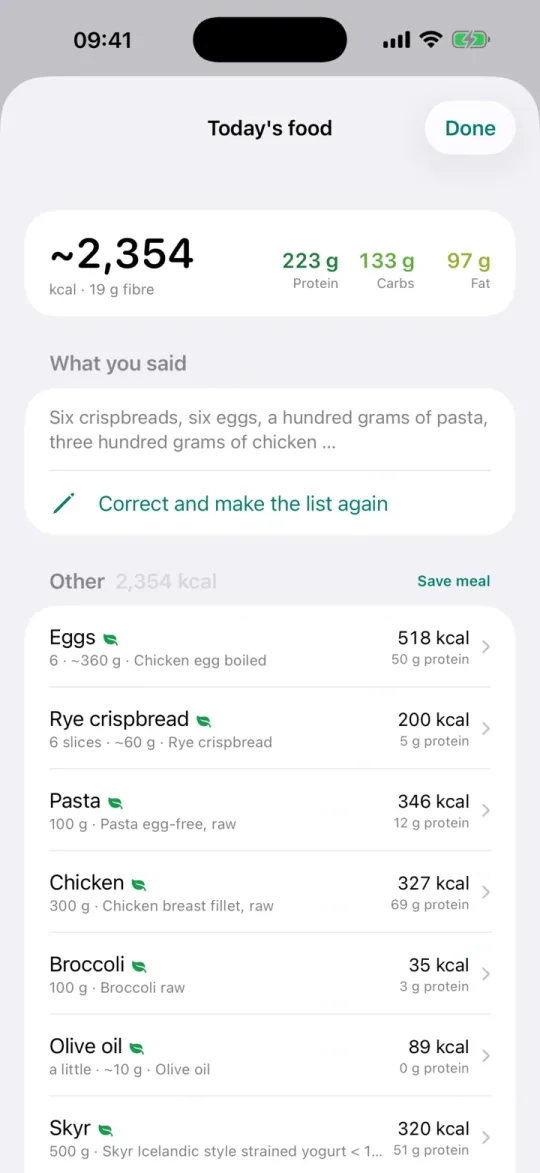
Mitovo turns it into a list by meal, with calories, protein, carbs and fat. Amounts you didn’t say are estimated and marked ~. The list is saved as soon as it’s made.
If you’ve described your usual day, Just the usual adds it in one tap, and you only say what was different. The language Mitovo listens for is set in You › App › Dictation language.
2. Change the list, or log without speaking
- Change an item: tap it to set the Amount, move it to another Meal, pick a different food from the food table, or Remove from list. You can also swipe it away.
- Add more: Add more by voice or text, or Add food under a meal.
- Search: tap Search, type a food, product or brand, set the grams or a portion, and tap Add. Search branded products looks in Open Food Facts.
- Scan: tap Scan and point the camera at a barcode. If the product isn’t known yet, you can photograph its nutrition table or type the values in.
- Saved meals: Save meal under a meal keeps it; Saved meal adds it again later.
- Start over: Delete this day’s log at the bottom.
Every change is saved as you make it. Tap Done when you’re finished: the list closes once it’s saved, or stays open with the reason if it couldn’t be. To log another day, tap that day under Last 7 days.
3. Your targets
The Today card shows your energy target as a range and bars for Protein, Carbs and Fat: what you’ve eaten against the target. The targets follow your training: a Rest day gets fewer carbs than a Hard day, and planned sessions add fuelling notes (“up to … g carbs per hour”). Targets appear once Mitovo knows your weight; a weigh-in in Apple Health is enough. The ⓘ button explains how they’re set; the whole method is in nutrition targets.
Set your goal in You › Nutrition › Goal and targets: Keep my weight, Lose weight, Gain weight or Fuel performance. For losing or gaining, pick How fast; you can also Set my own protein target. Tap Save. Until you choose, Mitovo assumes you want to keep your weight.
4. The rest of the tab
- Last 7 days: each day as logged, estimated from your typical day, or not logged. Tap a day to open it.
- Energy: what you ate against what you burned, by day, week or month, with your maintenance estimate.
- Body: your weight trend and, if you’ve measured it, your body composition. Weigh-ins come from Apple Health or You › About you › Weight.
- Vitamins, minerals and macros (on the Today card): your nutrients over a day, 7 or 28 days, against reference values. Being below a line doesn’t mean a deficiency; only a blood test can show that.
Your supplements go in You › Nutrition › Supplements (scan a label or add by hand). They count towards your nutrients; your coach sees the list but never recommends doses.
5. Ask your coach about your food
On the nutrients page, tap Ask the coach about these days. A request about the days you picked opens; send it, and your coach answers with what stands out and meal ideas that fit, which you can Save to my meals. Your diet, allergies and foods you don’t eat go in You › Nutrition › Food preferences, so suggestions leave them out. Your coach doesn’t give medical advice: see how the AI coach is kept in check.
6. Apple Health, Mac and offline
On the iPhone, the food you log goes into Apple Health. Mitovo also reads the daily totals other food apps save there: a day you didn’t log in Mitovo uses them. On the Mac, there’s no camera, so you type the number under the barcode instead.
Apple’s speech recognition turns what you say into text; to make the list, Mitovo sends that text to its AI provider (Anthropic’s Claude), which reads it. What’s stored and where: privacy policy.
Offline: recent foods, your own foods, saved meals, Just the usual and removing items work without a connection. Making a list from what you said, scanning, searching the food table and branded products, and changing your goal need a connection.
Questions
How do I log food by voice in Mitovo?
On the Nutrition tab, tap Log today's food, tap the microphone and say what you ate, in any order. Tap again to stop, then tap Make my list. Mitovo turns it into a list by meal, with amounts you didn't say estimated and marked with ~.
Does Mitovo write my food to Apple Health?
Yes. On the iPhone, every food you log in Mitovo goes into Apple Health as a food entry, and changes are written again. Mitovo also reads the daily totals other food apps save there, for days you didn't log in Mitovo.