Offline mode: Mitovo without internet
Mitovo works without internet as far as it can: it opens, shows what it last loaded, and keeps what you log until it can send it. This page shows what works offline, how your changes get sent, and what needs a connection.
Updated:
There’s nothing to switch on: when Mitovo can’t reach its server, because you have no signal or the connection is too weak, it works offline by itself, on the iPhone and on the Mac.
1. What you see offline
- Mitovo opens as usual. Being offline doesn’t log you out. Only logging in needs a connection: on the login screen Mitovo says “You’re offline. Logging in needs a connection.”
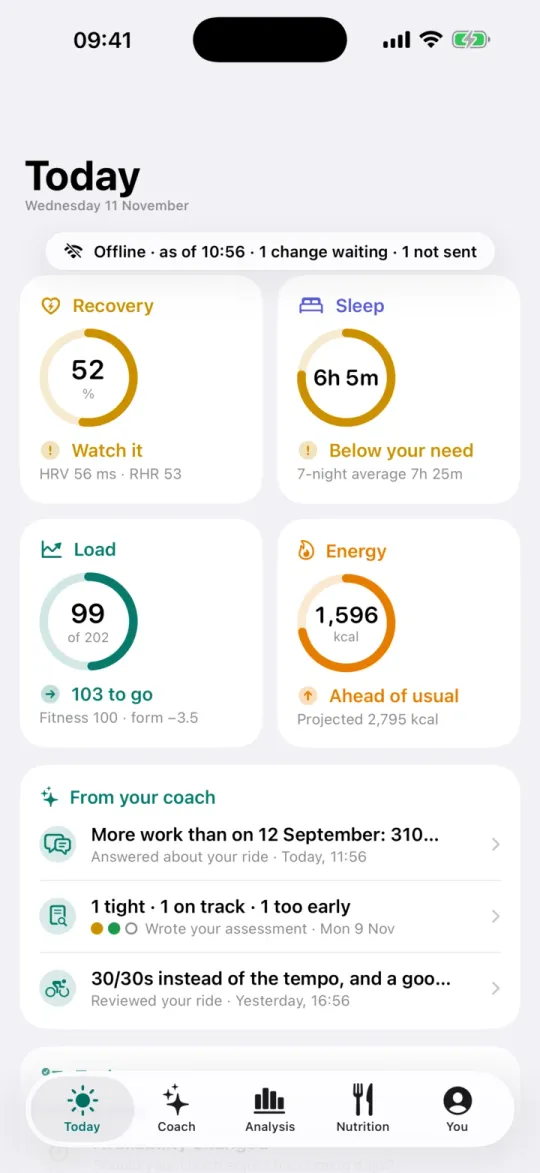
- A banner at the top of every page says Offline, or Offline · as of 08:12 once a screen shows something Mitovo stored, with the time of the oldest stored answer on show.
- Screens show what Mitovo last loaded. Analysis isn’t recalculated until you’re back online. A screen Mitovo has never loaded shows Not available offline: “Mitovo hasn’t stored this yet. It loads once you’re online.”
2. Before you go somewhere without signal
While you’re online, each time you open Mitovo (at most every 15 minutes) it loads in the background what you may need offline, even if you haven’t opened it yet:
- your plan for the next two weeks, and today’s and tomorrow’s sessions in full, with their steps, exercises and drills,
- your strength workouts, the exercises and the weights you used last time,
- the breathing and meditation methods,
- your recent workouts,
- your nutrition targets, today’s food log, your recent foods, own foods and saved meals.
Before a trip, a race or a gym without signal, open Mitovo once while you’re online. Anything else you open online is stored too.
3. What works offline
These are saved on your device at once, show as done, and are sent when Mitovo can reach its server again:
- logging a strength session, and breathing or meditation sessions,
- the morning check-in on Today,
- food from your recent foods, own foods and saved meals, Just the usual and values you type in, and removing food,
- a weigh-in in You › About you › Weight,
- skipping or moving a planned session,
- rides: they start and record as usual; the upload waits.
Your Apple Watch and the widgets keep showing what they have. The Apple Health sync waits: You › Connections › Apple Health says Waits for a connection, and it carries on once you’re back online.
4. What needs a connection
Buttons that need Mitovo’s server are greyed out with Needs a connection, instead of failing after you tap them:
- everything with your coach: coach requests, planning your weeks, changes to your plan, workout reviews,
- settings and your details in You, goals, injuries, time off,
- connections (Strava, and Apple Health’s Sync now),
- documents and lab values,
- reading food from what you say or type, scanning a barcode and searching branded products,
- the data export, logging in, deleting your account, and the subscription.
On the Mac, File › New Coach Request, Import FIT Files… and Upload Document… need a connection too, as do files you drop on the window.
5. Your waiting changes
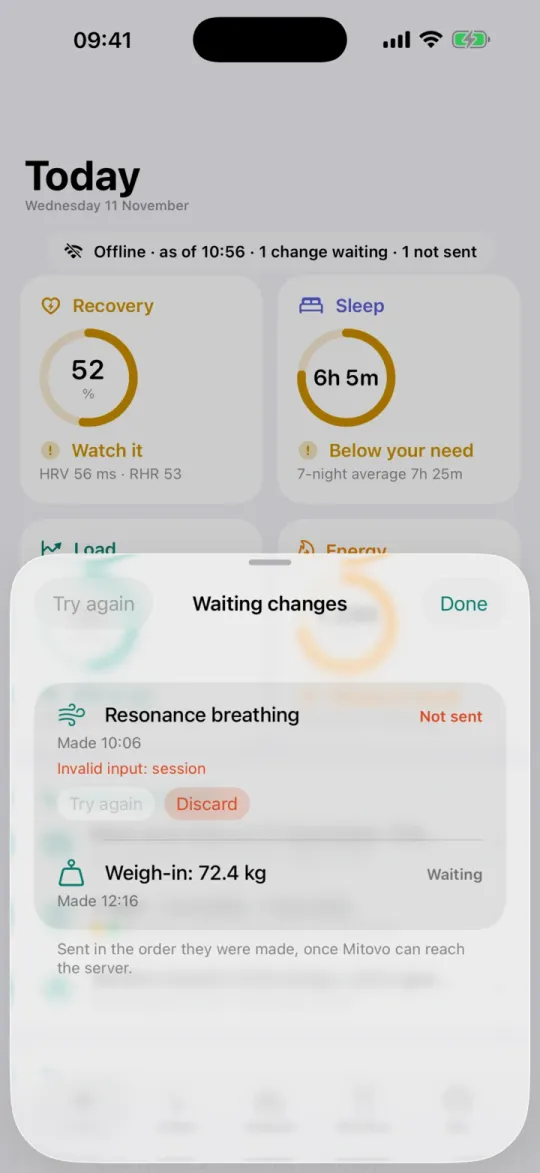
While something waits, the banner adds it, for example Offline · as of 08:12 · 3 changes waiting. Tap the banner to open Waiting changes: each change with what it is, when you made it, and Waiting or Not sent.
- Back online, Mitovo sends them in the order you made them. The banner says Sending 3 changes…, then Up to date.
- A change the server refuses stays in the list as Not sent, with the reason. Tap Try again, or Discard to delete it from your device without sending it.
- Try again at the top, or pulling down on the list, sends everything that’s waiting.
6. When something changed in the meantime
Your coach or your Mac may have changed something while your iPhone was offline. Mitovo then sorts it out like this:
- Skipping or moving a session: the plan on the server wins. If your coach changed that week in the meantime, your change isn’t applied: “Your change to Tempo run wasn’t applied: the plan changed while you were offline.”
- A strength, breathing or meditation session is always saved. If the planned session it belonged to is gone: “Saved, but your plan changed: it’s not counted against a session.”
- The morning check-in: the answer you gave last counts.
- Food: what you added and removed offline is merged into the day; food added on another device stays.
These notes show once in the banner and at the top of Waiting changes.
7. Logging out, and what’s stored
Logging out deletes changes that haven’t been sent, so Mitovo asks first: Log out? “3 changes haven’t been sent. Logging out deletes them.” Go online first and let them send.
What Mitovo stores for offline use stays on your device, isn’t part of your device backups, and is deleted when you log out or delete your account.
Questions
Does Mitovo work without internet?
Yes, as far as it can. It opens and shows what it last loaded, and logging a strength, breathing or meditation session, the morning check-in, food from your recent foods, a weigh-in, skipping or moving a session and rides all work offline. Everything that needs your coach waits for a connection.
Will I lose what I log while I'm offline?
No. Mitovo keeps it on your device and sends it, in the order you made it, as soon as it can reach its server. A change the server refuses stays in the list of waiting changes with the reason, so you can try again or discard it.