Your account: data export, logging out, deleting it
Your Mitovo account is in You › Account. This page shows what you find there, how to get a copy of everything Mitovo stores about you, and what happens when you log out or delete your account.
Updated:
Everything about the account itself is in You › Account. Your name, year of birth, sex and height are in You › About you › Personal details, your weight in You › About you › Weight. Mitovo has no password: you log in with a code sent to your email, or with Sign in with Apple (Getting started).
1. What’s in You › Account
- Email: the address you log in with. If you use Sign in with Apple, Sign in with Apple shows below it.
- Time zone: follows your device. Your days, your plan and the times of your notifications use it.
- Consent given: the day you agreed to how Mitovo handles your health data when you signed up.
- Subscription and AI usage: your subscription and your coach’s AI this month (Subscription and free trial).
- Export my data, Log out and Delete account and all data, below.
The privacy policy, the terms of use, the imprint and the support page are in You › App › Legal and support.
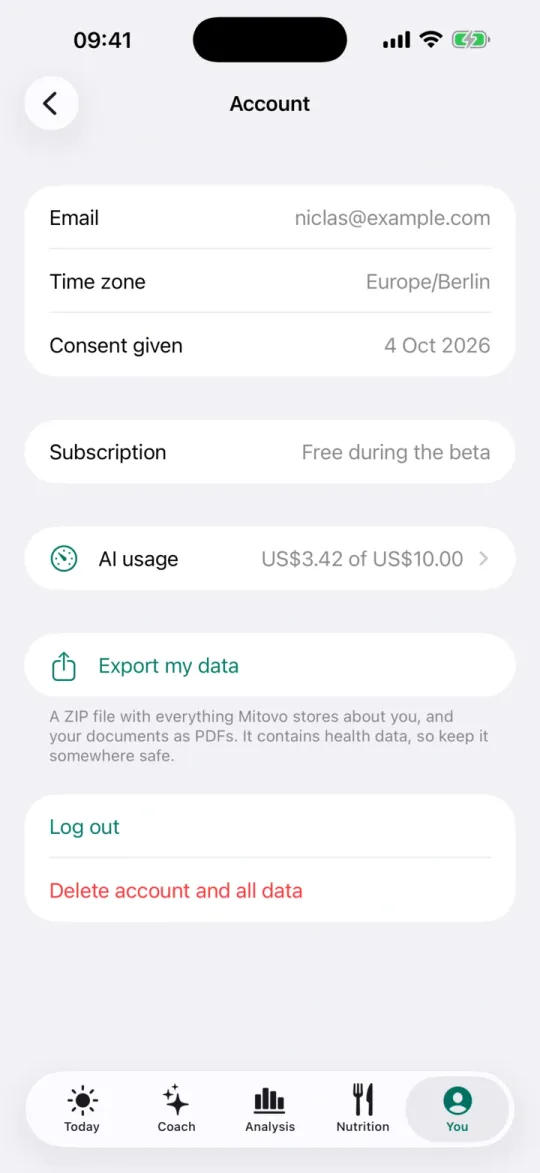
2. Export your data
- Tap You › Account › Export my data.
- Mitovo puts together a ZIP file, which can take a moment.
- Save it or send it on: on the iPhone the share sheet opens (Save to Files, AirDrop, Mail and so on); on the Mac, share it or tap Show in Finder.
The file, mitovo-export- with the date, holds:
data.json: everything Mitovo stores about you, one list per kind of record, for example your profile, workouts, plans, food logs, health records and your coach requests.documents/: the documents you uploaded, as PDFs.README.txt, which explains both.
Not in it: login codes, sign-in tokens and the security log. As the app says: “It contains health data, so keep it somewhere safe.”
3. Log out
Tap You › Account › Log out. Your account and your data stay on Mitovo’s server; log in again any time with the same email address. What Mitovo stored on this device for offline use is deleted.
If changes you made offline haven’t been sent yet, Mitovo asks first: Log out? “3 changes haven’t been sent. Logging out deletes them.” Cancel, go online and let Mitovo send them, then log out (Offline mode).
4. Delete your account
Before you delete:
- Export your data if you want a copy: afterwards there’s nothing left to export.
- Cancel your subscription in your App Store settings (You › Account › Manage subscription). Deleting your account doesn’t end it with Apple.
Then:
- Tap You › Account › Delete account and all data.
- Delete your account? says: “This removes everything Mitovo stored about you from the server. Your Apple Health data stays untouched. This can’t be undone.”
- Tap Delete account and all data.
What happens then:
- Your account and all its data are removed from Mitovo’s database straight away: workouts, plans, nutrition, health records, documents and coach requests. Encrypted backups expire within 30 days (privacy policy).
- If you used Sign in with Apple, Mitovo gives up its access to your Apple Account. If Strava is connected, Mitovo disconnects it; rides already on Strava stay there.
- You get an email confirming the deletion. If you didn’t delete your account yourself, reply to it.
- Mitovo logs out on this device and deletes what it stored there.
- Your data in Apple Health stays on your iPhone, untouched.
Deleting needs a connection. If you log in with the same email address later, you start with a new, empty account.
5. Questions about your data
How Mitovo handles your data, where it’s stored and your rights: the privacy policy. Anything else: write to support@mitovo.app.
Questions
Does deleting my Mitovo account cancel my subscription?
No. Apple handles the subscription, so cancel it in your App Store settings as well: in the app under You › Account › Manage subscription, or on your iPhone in Settings › your name › Subscriptions.
What's in the Mitovo data export?
A ZIP file with data.json, everything Mitovo stores about you as one list per kind of record, and a documents folder with the documents you uploaded as PDFs. It contains health data, so keep it somewhere safe.