Subscription and free trial: subscribe, cancel, restore
Mitovo's coach comes with one subscription for iPhone and Mac, monthly or yearly, and the first 14 days are free. This page shows where to subscribe, how to cancel or restore, and what keeps working without a subscription.
Updated:
You subscribe through the App Store with your Apple Account. Apple is the seller, so payment, receipts, cancelling and refunds go through Apple (terms of use, section 5).
1. Prices and the free trial
- Monthly: €19.99 a month, or Yearly: €179.99 a year, in Germany including VAT. The App Store sets the price in other countries and shows it before you buy.
- New subscribers get the first 14 days free, once. If you don’t cancel at least 24 hours before the trial ends, the paid subscription starts and Apple charges you.
- Three days before your trial ends, Mitovo emails you a reminder with what Apple will charge, unless you’ve already cancelled.
- One subscription covers your iPhone and your Mac: Mitovo is one app on the App Store, and the subscription belongs to your Mitovo account. It isn’t shared through Family Sharing.
2. Subscribe
The subscription screen, Your coach, every week, opens:
- at the end of the plan setup, in place of Let’s plan your season, before your coach plans your first season (Getting started),
- when you tap something that needs your coach and you have no subscription,
- from You › Account › Subscribe.
- Pick monthly or yearly. The screen shows each price, the free trial and that the subscription renews automatically, with links to the terms and the privacy policy.
- Tap the subscribe button and confirm in Apple’s payment sheet.
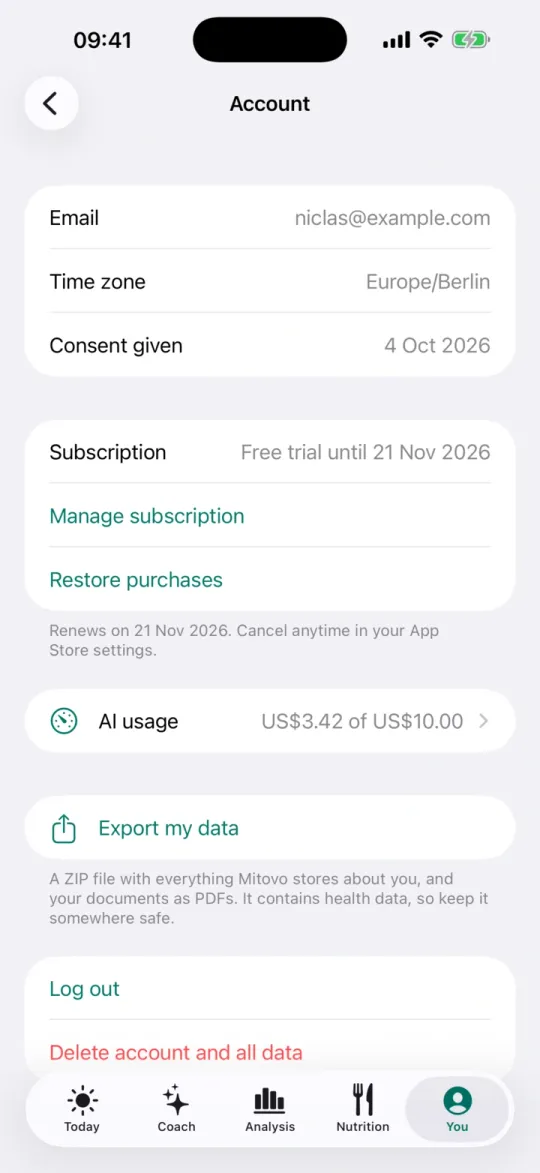
- Your coach is open straight away. You › Account › Subscription now says Free trial until … with the date (Monthly or Yearly if you’ve had the free trial before).
3. Where you stand
You › Account › Subscription shows one of these, with a line underneath:
- Free trial until …: your trial, until that day.
- Monthly or Yearly: “Renews on …. Cancel anytime in your App Store settings.” Once you’ve cancelled: “Ends on …. Your data stays; the coach stops.”
- Not subscribed: no subscription; Subscribe opens the subscription screen.
- Payment problem: “The App Store couldn’t renew your subscription. Update your payment method in your Apple account to keep your coach.” Once Apple can charge you again, your coach carries on.
- Free until …: you used Mitovo before the subscription was introduced, and the coach stays free for you until that day.
4. Cancel, or switch between monthly and yearly
- Tap You › Account › Manage subscription. It opens Apple’s subscriptions page for your Apple Account. On your iPhone you can also go to Settings › your name › Subscriptions.
- Choose Mitovo, then cancel, or switch between monthly and yearly.
Cancel at least 24 hours before the trial or the current period ends. Your subscription runs until the end of the period you’ve paid for, and Subscription says Ends on …. The day after you cancel, Mitovo emails you one question about why; you can turn that email off in You › App › To-dos & notifications › Tips by email.
Deleting your Mitovo account doesn’t cancel the subscription with Apple: cancel it as well (Account and data).
5. Restore a purchase
When you log in, on a new iPhone, after reinstalling or on your Mac, Mitovo checks your Apple Account for your subscription by itself. If your coach still asks you to subscribe:
- Check that you’re logged in to the Mitovo account you subscribed with, on a device signed in to the Apple Account you paid with.
- Tap You › Account › Restore purchases, or restore on the subscription screen.
A subscription serves one Mitovo account at a time: restoring it while you’re logged in to another Mitovo account moves it to that account.
6. When the trial or subscription ends
Without a subscription your coach pauses. Subscription says Not subscribed, and You › Account › AI usage says No subscription. As the app puts it: “Without a subscription your data, Apple Health sync, export and deletion keep working; the coach pauses.”
- Paused: everything your coach does with AI: planning your season and your weeks, changes to your plan, coach requests, workout reviews, where you stand on your goals, race plans, the weekly nutrition review, reading food from what you say or type (also your typical day and supplement labels), reading documents, the coach’s note on lab values, and questions for a doctor’s visit.
- Still works: everything you’ve stored, including the plan you have, the Apple Health sync, logging strength sessions, breathing and meditation, rides, food you add by search or barcode scan, the morning check-in, the data export and deleting your account.
Tap something that needs your coach and the subscription screen opens. Subscribe again any time: your data is still there.
7. Your coach’s AI each month
Every account has a monthly budget for its coach’s AI, subscribers too. You › Account › AI usage shows This month and, under What’s left, roughly how many Coach requests, Plan changes and Workout reviews that still is. “One budget covers everything your coach does with AI. It starts again on the 1st of every month; nothing carries over.”
When it runs low, Today says Plan changes are paused: the rest is kept for your weekly planning, and your coach still answers questions. When it’s gone, Today says This month’s AI is used up: your plan, logging and Sunday’s weekly planning keep going, your coach answers short questions, and changes you ask for and reviews wait until the 1st.
Questions
How much does Mitovo cost?
In Germany €19.99 a month or €179.99 a year, including VAT. The App Store sets the price in other countries and shows it before you buy. New subscribers get the first 14 days free, once.
How do I cancel my Mitovo subscription?
In the app, tap You › Account › Manage subscription, or on your iPhone open Settings › your name › Subscriptions. Cancel at least 24 hours before the trial or the current period ends; the subscription then runs until the end of that period.
What happens to my data when my subscription ends?
It stays. Without a subscription your coach pauses, but your data, the Apple Health sync, the export and deleting your account keep working. Subscribe again and your coach picks up where it stopped.