Health records: injuries, lab values, documents, visits
Under You › Health, Mitovo keeps what affects your training: injuries and illness, lab values, documents from your doctor, your visits and the check-ups for your age. This page shows how to add each, and what Mitovo does with it.
Updated:
Everything here is in You › Health: Health check, Injuries and illness, Sleep, Lab values, Documents, Doctor visits and Check-ups. Mitovo is a training app, not a medical one: it plans your training around what you enter and doesn’t diagnose anything. If you feel unwell, see a doctor; in an emergency, call your local emergency number (112 in the EU).
1. Health check
The questions from your first start, for example about heart conditions, medication that changes your heart rate or a recent operation. Change your answers here any time: tick what applies and tap Check answers (with nothing ticked, None of these apply) to save them. If an answer changes your plan, What this means says how, for example no hard sessions until you confirm a doctor’s clearance with I’ve been cleared.
2. Injuries and illness
- Tap + (or Log injury or illness).
- Pick the Type (Injury, Illness or Pain), say what it is, and for an injury or pain the Body part and Side.
- Set Since, the Severity and how it affects Training (Unaffected, Reduced or Paused). Under Avoid while active, switch on the sports your plan should leave out.
- Tap Save. If it affects your training, Mitovo asks Adjust your plan now?: Adjust my plan… has your coach change the coming days around it, Later leaves it on Today.
Tap an entry to open its page: Ask my coach about it, add dated Updates on how it’s going (your coach reads the latest ones), and Mark as resolved when you’re better (or Edit it and turn on Resolved with an earlier date). Active entries also show on Today. Until it’s resolved, your plan leaves out the sports you avoid, and your coach plans around the entry. The morning check-in opens this log too when you answer Ill or Injured.
If you describe warning signs such as chest pain or fainting, Mitovo pauses training suggestions and shows Call 112 and I’m okay, resume on Today.
3. Lab values and documents
Add a lab report: in Lab values, tap + › Add a lab report (or in Documents, tap +).
- Pick what it is: Lab report, Doctor’s letter or Other document.
- Scan it with the camera, choose photos or choose a PDF (up to 20 MB and 20 pages).
- Mitovo reads it, which takes about half a minute; you can leave the screen meanwhile.
- Check what Mitovo read. Rows under Needs a look first: tap a value to correct it, swipe to leave it out. Then tap the button to save the values. Nothing is saved before that.
From a doctor’s letter, Mitovo picks out What matters for your training, for example instructions or a next appointment; Add to your injury log turns it into an injury entry.
Type a value in: Lab values › + › Type a value in: the marker, the Sample date, the value with its unit and Your lab’s range, then Save.
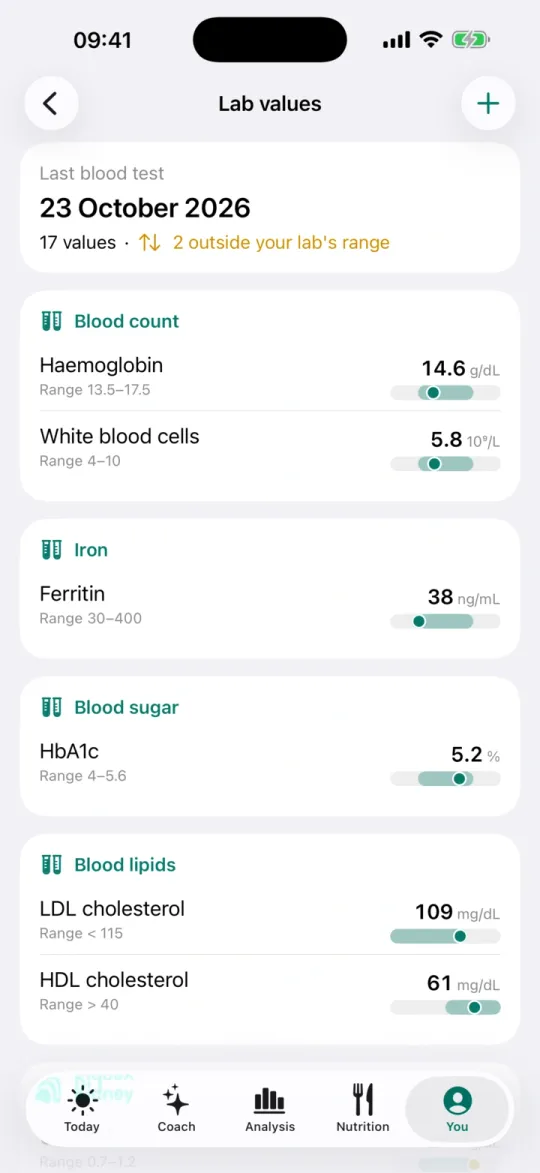
What Mitovo shows: each value against the range printed on your lab report (Mitovo has no ranges of its own), with an arrow when it’s outside, and its trend over time. Tap a marker for its history and, under Training before this sample, how your training in the days before might have raised it. As the app says: “Ranges are the ones printed on your lab report. Mitovo doesn’t diagnose: talk to your doctor about values outside the range.” After you save the values from a lab report, your coach writes a short note, with questions you could ask your doctor.
In Documents, open a document: its ⋯ menu shows it again, reads it again, or deletes it: either just the file or the file with its values.
4. Doctor visits
- In Doctor visits, tap +.
- Add the date, the doctor and Why you’re going. Under Questions to ask, add your own, or tap Ask your coach for questions.
- From the day of the visit, note What did the doctor say? and tap Tell your coach: a request to your coach opens with your notes, so your plan can follow them. A Follow-up visit can be added too.
On the day of a visit, Today asks What did the doctor say? for three days, until you’ve noted it.
5. Check-ups
Check-ups lists the statutory screenings in Germany for your age and sex (source: the G-BA), once your year of birth and sex are in You › About you › Personal details. Tap one to mark it with I’ve had it…, Hide it, or open its source. It’s general information, not a recommendation for you.
6. What your coach sees, and your data
Your coach sees your active injuries and illnesses with their restrictions, your lab values and the instructions from letters you confirmed. It follows your doctor’s and physio’s instructions and doesn’t replace them. How the AI coach is kept in check.
Documents are stored encrypted. To read them, Mitovo sends them to its AI provider (Anthropic), including your name and address if they’re on the document; black them out first if you don’t want that. You › Account › Export my data includes your documents, and Delete account and all data removes everything (account and data). Details: privacy policy.
Offline: what you’ve stored stays readable. Adding, changing, deleting and uploading need a connection.
Questions
Does Mitovo interpret my blood test results?
No. Mitovo shows each value against the range printed on your lab report and its trend over time, and notes when training in the days before the sample can raise a value. It doesn't diagnose: talk to your doctor about values outside the range.
What happens to the documents I upload to Mitovo?
Mitovo sends the document to its AI provider (Anthropic) to read the values or instructions, including your name and address if they're on it, so black them out first if you like. The document is stored encrypted, nothing is saved until you check what Mitovo read, and you can delete it any time.