Ask your coach: what it can and can't change
You can write to your coach about your plan, a session, a workout, your recovery or your nutrition targets. It answers with one card: an explanation, a question back, or a change you decide on. This page shows where to ask, what it can change and where its limits are.
Updated:
The coach is an AI model working inside rules that Mitovo’s code sets: what it may change, the plan check every change has to pass, and the questions it doesn’t answer. How those rules work: how the AI coach is kept in check.
1. Ask
- On the Coach tab, tap Ask your coach… in the Ask your coach card.
- Write your question or what you’d like changed, or dictate it with the microphone. For example: “Why is Thursday’s run so easy?” or “Can we move the long ride to Sunday?”
- Tap the send arrow. You can close the sheet: while your coach works, a pill on every tab says so, and it tells you when the answer is in. A change to your plan can take a few minutes.
You can send the next request while your coach is still answering: it answers them one after another, in the order you sent them, so each answer knows what the one before changed. The pill counts the answers on the way (Your coach is working on 2 answers…) and shows each one as it comes in.
From a to-do: when a to-do on Today asks you something, Answer opens that to-do’s own conversation: its question, your answer and your coach’s reply. The to-do ticks off once your coach has your answer. You can answer the next to-do right away.
From a session or a workout: on a planned session, tap the coach button at the top (Ask the coach), and the request is about that session. On a workout you did, use Ask your coach on its page; the questions about that workout stay together there. In Pick another workout, Ask my coach opens your coach with the day and the session filled in.
From an injury or illness: on an entry’s page (from the Injuries and illness card on Today or You › Health › Injuries and illness), Ask my coach sends your question with the entry and its latest updates. Your coach answers about your training around it; it doesn’t diagnose.
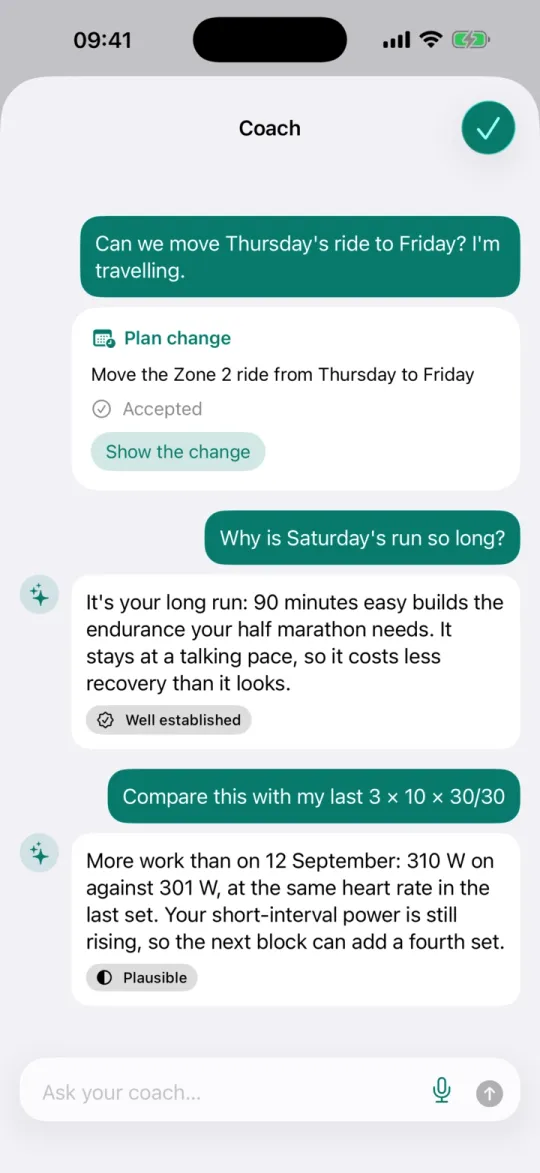
2. What the coach answers with
Every request gets one card:
- An explanation about your own plan, sessions, workouts, load, recovery, sleep, goals, progress or nutrition targets, and, where it gives one, its evidence level (Well established, Plausible or Speculative).
- A question back with two to four answers to tap, when it needs to know more.
- A proposal: a change you decide on (below).
- Noted, when it only saved what you told it.
- A bike workout it built for you, saved to Your workouts, with Ride it to ride it in Mitovo Ride.
3. What the coach can change, once you accept
Nothing your coach proposes takes effect until you say yes:
- Your sessions and phases (Plan change): tap Review this change, look at the sessions and phases it changes, then Accept or Reject. Reject opens What should be different?: Just reject keeps your plan, Ask for a different change sends your note for another proposal. An open change expires after seven days, and your plan stays as it is.
- Your goals (New goal, Goal change), injuries and illness (Injury or illness), a value you told it such as your FTP (Save to your profile), when you can train (Schedule change), your food preferences (Food preferences) and your nutrition targets (Nutrition change): each card has Not now and Add, Apply or Save.
Changes to sessions stay within your planned weeks: the weeks after those come with your Sunday planning.
What your coach saves by itself: notes about lasting things you tell it (Noted: …), which you find, edit or delete in You › Training › What the coach knows, and to-dos it adds to Today (Added to Today: …).
4. What it can’t change or answer
- Nothing past the plan check. Every change goes through Mitovo’s plan check in code before you see it: your time, rest days, how fast load grows, injury restrictions. If your request breaks one of those rules, the coach answers I couldn’t make that change within your plan’s safety rules. The rules: the plan validator.
- No medical questions. It doesn’t assess symptoms, lab values, medication or supplements, and it doesn’t diagnose. It answers That’s a question for your doctor. Words that can be a warning sign, such as chest pain or fainting, bring up a safety card instead, and training suggestions pause until you tap I’m okay, resume.
- Nothing outside training. It helps with your training, recovery and nutrition targets, not with recipes, general knowledge or anything else.
- Not your training-load limits, your health check or your account. Those you change yourself, in You.
- Not two changes at once. While a change waits for your decision, it says Your coach has a change waiting for your decision. Decide it first, then ask again.
The coach’s AI has a monthly budget. When it runs low, plan changes pause and your coach still answers questions; the AI this month card at the bottom of the Coach tab shows where you are.
5. Other ways to get a change
- Change weeks on the week card of the Coach tab: write what should change (“No swim on Wednesday next week”) and tap Send. Your coach reworks your sessions from today to the end of the planned weeks and proposes the change.
- Adjust my plan on Today (with a single reason, the row is named after it): an injury, a schedule change, time off or a changed goal waits there until you tap it and ask your coach to adjust for all of them at once.
- Ask for changes in the review of your Sunday planning.
- Your own edits: moving, skipping or changing a session doesn’t need the coach at all: changing a session.
Questions
Can Mitovo's coach change my plan without asking me?
No. Every change to your plan, your goals, your values or your nutrition targets comes as a proposal you accept or reject. The only things your coach saves by itself are notes about what you told it and to-dos on Today, and you can see both. One exception: two weeks from your Sunday planning that you haven't decided on by their first day start as proposed.
Can I ask the coach medical questions?
No. Mitovo is a training coach, not a doctor. It doesn't assess symptoms, lab values, medication or supplements; for those it tells you to ask your doctor. Words that can be a warning sign bring up a safety card instead of an answer.
Why did my coach say it couldn't make a change?
Every change your coach writes goes through Mitovo's plan check in code. If what you asked for breaks one of the plan's safety rules, for example a jump in load that's too big, your coach can't make it and tells you so.