Strength sessions: logging sets and weights
Mitovo logs strength training set by set: weight, reps and how many reps you had left. This page shows how to start a session, log it, finish it and change it later.
Updated:
1. Start a session
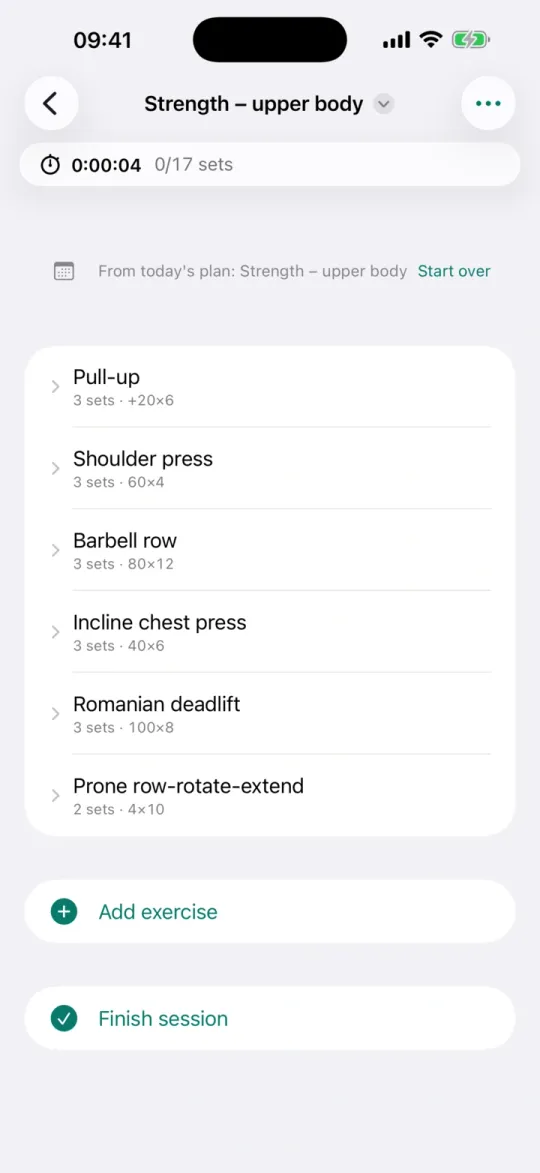
- A planned session: open it from Today and tap Start. Mitovo fills in the exercises, sets and target weights your coach planned.
- Your own session: on Today, tap Strength under Start a session, then Start new session. If today has a planned strength session that isn’t logged yet, Mitovo fills it in for you (Start over clears it); otherwise you start empty and tap Add exercise.
- A saved workout: on the same Strength page, swipe right on a workout under Saved workouts to start it.
Finding an exercise: Add exercise, Switch exercise and the exercise list have a search field. Type a few words in any order, in English or German: every word has to match the exercise’s name, another common name or abbreviation, its equipment or a muscle. “row dumbbell”, “Rudern Kurzhantel” and “DB row” all find the dumbbell row, “RDL” the Romanian deadlift, “skull crusher” and “Stirndrücken” the same triceps exercise. The start of a word is enough; capitals, accents and plurals don’t matter. If the exercise you want isn’t there, Create “…” adds it as your own.
2. Log your sets
Each exercise is a row; tap it to open its sets. Every set has Last (what you did last time), kg (or lb), Reps and RIR.
- Type the weight, the reps and your RIR: how many more good reps you had left (tap RIR for a short explanation). Timed exercises ask for seconds, some for metres.
- Or tap a Last value to copy last time’s set into the row.
- Tap the tick at the end of the row when the set is done. The rest timer starts.
Weights are filled in for you where Mitovo can: from your coach’s plan (a weight or a percentage of your estimated 1RM), otherwise from your last session of that exercise. Why reps in reserve: strength training.
More you can do:
- Add set copies the previous set. Swipe left on a set to delete it. Touch and hold a set to mark it as a Warm-up set.
- The ⋯ menu on an exercise has Switch exercise (similar exercises first; only this session changes), Reorder exercises, Reorder sets and Remove exercise.
- The ⓘ button on an exercise shows how to do it.
3. Rest timer, lock screen and Watch
The rest timer runs at the top of the logger: 150 seconds after sets of squats, hinges, pushes and pulls, 90 seconds otherwise. Skip ends it early. If you leave the app, a notification tells you when your rest is over, and with Live Activities allowed, the lock screen shows the next set and the countdown.
With your Apple Watch, the Mitovo app on the Watch shows the running session: the exercise, the set, weight and reps. Tap the values to change them with the Digital Crown, then tap Done; the rest countdown follows. Start, finish and add exercises on the iPhone.
You can leave the logger at any time: the session stays open as a draft on your iPhone, even if you close the app, and Strength shows it under In progress.
4. Finish and save
- Tap Finish session below the exercises.
- Rate How hard was the whole session? from 0 to 10.
- Check Started and Finished, and the Active energy (an estimate you can change; Use estimate brings it back).
- Tap Save session.
The session goes into your training log and, on the iPhone, into Apple Health as a strength workout. To drop a session instead, use the logger’s ⋯ menu › Discard session.
5. Change a logged session
Open the workout on Analysis (under Recent sessions or See all) and tap Edit sets on its sets card. Change what you need, tap Save changes, then Save session. Delete session removes it, also from Apple Health.
6. Workouts of your own
Save as workout in the logger’s ⋯ menu keeps a session’s exercises and sets as a workout. On the Strength page, Create new workout builds one from scratch; open a saved workout to change it (changes save by themselves), Start workout or Add to my plan. Your coach’s strength workouts are listed under From your coach; change one and it’s saved as your version.
All the exercises, each with a moving figure and how to do it, are under Strength exercises in the library card on the Coach tab.
Offline: logging and saving a session work without a connection and are sent when you’re back online. Creating, saving or changing workouts and editing a logged session need a connection.
Questions
Can I log my strength sets on Apple Watch?
Yes, once the session is running on your iPhone. The Mitovo app on your Watch shows the current exercise and set; tap the values to change weight or reps with the Digital Crown, tap Done, and the rest timer starts. Starting and finishing the session happen on the iPhone.
What does RIR mean in Mitovo?
Reps in reserve: how many more good reps you could have done at the end of a set. 0 means you couldn't have done another. Mitovo uses it with the weight and reps to estimate your 1RM and to plan the next sessions.