Your numbers and fitness tests: HR, FTP, pace, 1RM
Your zones and targets come from a few numbers: your heart rate, your FTP, your threshold pace, your CSS and your 1RMs. This page shows where to see them, how to change one, and how to take a fitness test and use its result.
Updated:
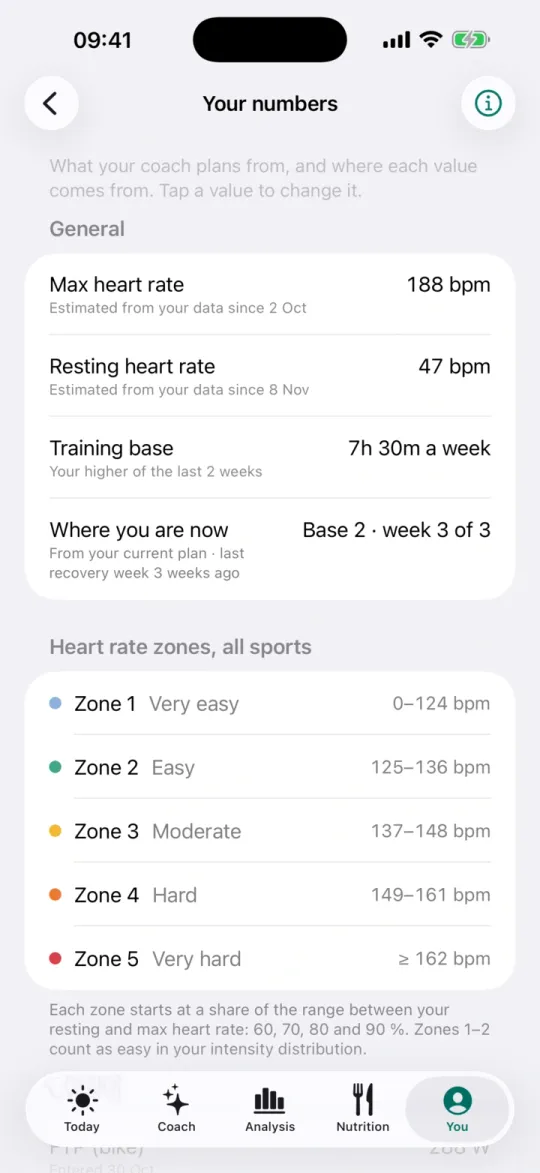
All your values are in one place: You › Training › Your numbers. It shows what your coach plans from and where each value comes from. Other places that show a value, such as a marker in Analysis, open this screen. How the values become zones and targets: zones and tests.
1. See your numbers
Open You › Training › Your numbers. The values are grouped: General first, then a section for each sport your goals need (Cycling, Running, Swimming, Strength). Under each value it says where it comes from, for example Entered by you, From a test, Estimated from your data, Apple’s estimate, From your logged sets or From your age, a rough guess.
Further down:
- Heart rate zones, all sports (or one set for running and one for cycling and other sports, when you set a separate max), and Power zones after Cycling once you have an FTP.
- More values: the values your goals don’t need right now, such as a separate max heart rate for running or for cycling.
- Your 1RMs for back squat, bench press, deadlift and overhead press (those not already under Strength).
- History of your values: every value you entered, newest first.
2. Change a value
- Tap the value, for example Max heart rate, Resting heart rate, FTP (bike), Threshold pace (run) or a lift.
- Enter the new value and, if it’s older, the date under Valid from.
- Tap Save. Your zones and targets follow from that date on, and your coach plans with the new value.
To go back to what Mitovo works out from your data, open the value and tap Back to automatic. For a 1RM it’s Remove my entry: then only your logged sets count. Your entry stays in the history either way.
Suggestions: when your workouts point to a clearly different value, it shows under it: Your workouts suggest … with Use this. For your FTP, From your rides shows 95 % of your best 20 minutes with power; tap Use to take it, or Not now. Mitovo never changes your FTP by itself.
A value missing: without an FTP or a threshold pace, sessions go by heart rate and feel; without a CSS, swim sets go by feel; without a 1RM, a lift starts by effort. The row says so and offers Enter FTP, Enter pace, Enter 1RM or Take the test.
3. Take a fitness test
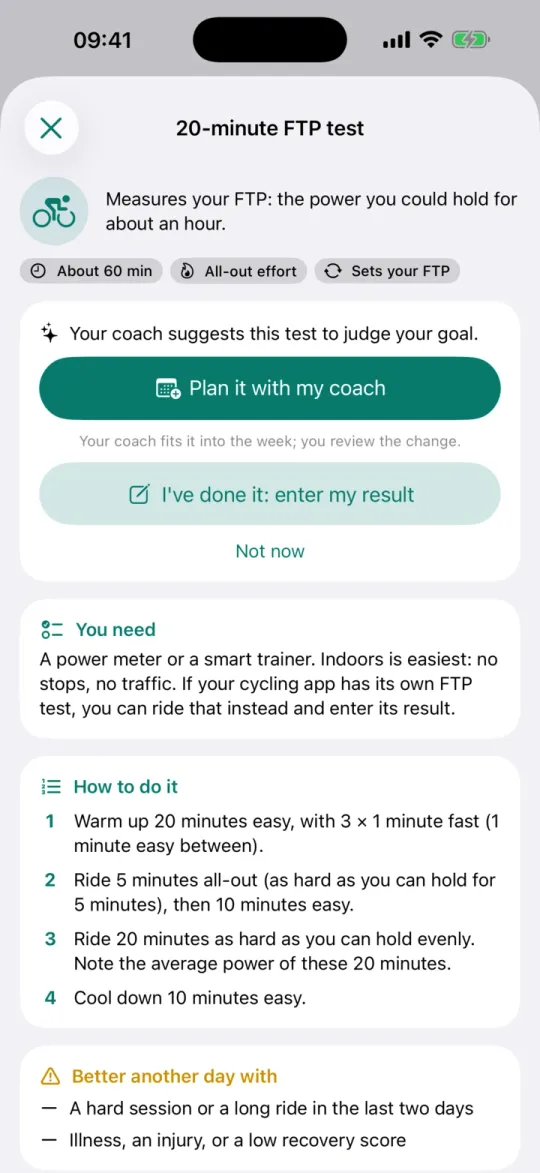
Every test your coach can plan is in the library card on the Coach tab: tap Fitness tests. All-out tests are hard sessions (a 30-minute run, a 20-minute or ramp FTP test, a CSS swim test and the Hyrox tests); Strength tests are a heavy set stopped short of failure. Tap a test to see what you need, how to do it and when better not to.
- Plan it with my coach: for an all-out test your coach finds a fresh day and adjusts the week around it; a lift test goes at the start of a strength session. The test closes once your request is sent; a pill on every tab shows your coach working, and you review the change on Today.
- Or, for a lift test, Start now: the strength logger opens with the test.
- Already done one? Tap I’ve done it: enter my result.
When your coach suggests a test, it shows on Today and on the test (Your coach suggests this test to judge your goal.). Not now sets it aside. On a day your recovery is low, the test says so and suggests a fresher day.
4. Use the result
- From the Watch: for a run or ride test you start on your Apple Watch, Mitovo reads the result from the workout after the sync. If it doesn’t show up, tap Enter result.
- FTP and threshold pace change only with your OK: Your result shows the new value next to the current one, with Use … and Keep …. Once you take it, it counts from the test day, and your zones and targets follow.
- Lift tests you log in the strength logger set your estimated 1RM for that lift at once; a result you enter by hand waits for Use … too.
- CSS sets your swim paces.
Repeat an all-out test every 8 to 12 weeks to see your progress; your logged sets keep a lift’s estimate up to date. Your results show among your markers on Analysis. How a result updates your zones: zones and tests.
Questions
How do I change my FTP in Mitovo?
Go to You › Training › Your numbers, tap FTP (bike), enter the new value and the date it's valid from, and tap Save. If your rides with power suggest a different FTP, it shows under From your rides; tap Use to take it.
Where do my heart-rate zones come from?
From your resting and max heart rate. Mitovo takes the values you enter, else estimates them from your data (your watch's resting heart rate, the highest heart rate in your workouts); without data, your max comes from an age formula, marked as a rough guess. Your numbers shows the zones and where each value comes from.
Does Mitovo change my FTP after a test?
Only when you say so. After an FTP or threshold-pace test, the result shows next to your current value with Use and Keep. A lift test read from your logged sets counts at once, since those sets count anyway.