Apple Health and Mitovo
Apple Health is where Mitovo gets your workouts, heart rate and sleep. This page shows how to connect it, what Mitovo reads and writes, and what to check when something is missing.
Updated:
Apple Health connects on the iPhone. The Mac app uses the same account and shows what your iPhone has synced. Mitovo syncs when it starts, when you pull down on Today and, when iOS allows, in the background.
1. Connect Apple Health
Most people connect it while signing up (Getting started). If you tapped Not now then:
- Open You › Connections › Apple Health.
- Tap Connect Apple Health.
- Allow the data types in Apple’s dialog.
The first sync brings in your history; while it runs, Today shows Syncing Apple Health with a count. In You › Connections, the Apple Health row now says Connected.
2. What Mitovo reads
- Workouts, with heart rate, distance, power from a power meter and the effort you rated. Routes are read on your iPhone for the workout map and never uploaded.
- Recovery: HRV, resting heart rate, walking heart rate, Cardio Recovery, VO₂max and breathing rate.
- Sleep, with its stages where your device records them, and your heart rate during sleep.
- Body: weight, body fat, lean body mass, height and blood pressure. Your date of birth and sex only fill in About you on your iPhone.
- Your day: active and resting energy, steps, walking, running, cycling and swimming distances, and exercise minutes.
- Mindful minutes from other apps.
- Food from other apps: energy, protein, carbs, fat and fibre per day.
How Mitovo turns this into recovery and load: recovery and sleep and training load.
3. What Mitovo writes
Mitovo writes only what you log in Mitovo, so other apps see it too:
- strength sessions as workouts, with their energy
- rides from Mitovo Ride, with energy, distance, heart rate, power, cadence and speed
- breathing sessions and meditations as mindful minutes
- the food you log, with its nutrients
- blood pressure readings you enter in Mitovo
- the effort you rate for a workout
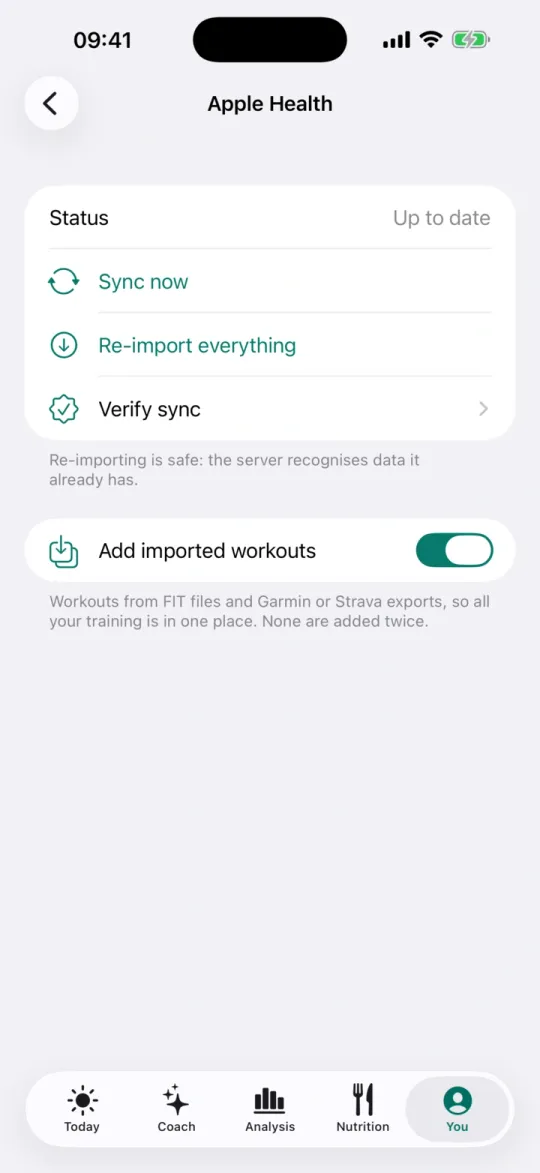
- imported workouts from FIT files and exports, if Add imported workouts is on in You › Connections › Apple Health (on by default). None are added twice.
4. Change what Mitovo may read
- Open Apple’s Health app and tap your profile picture.
- Under Privacy, tap Apps, then Mitovo.
- Turn on the data types you want to share.
- Open Mitovo so it can sync.
When a new version of Mitovo reads a new data type, it asks once for that type.
5. When a workout or your sleep doesn’t show
Go through these in order:
- Sync. In You › Connections › Apple Health, Status says Up to date, Syncing: Workouts, Failed or Waits for a connection (you’re offline), and Last sync says when it last finished. Tap Sync now.
- Is it in Apple Health? Mitovo only sees what’s there. If the workout is missing in Apple’s Health app too, the app or watch that recorded it doesn’t pass it on: turn that on in its settings, or import its FIT file in You › Connections › Import workouts (Strava and FIT files). If you wear a Garmin, You › Connections › Garmin shows which settings in Garmin’s app pass your data on to Apple Health.
- Permissions. Check that the type is turned on for Mitovo (step 4).
- Verify sync. Tap Verify sync, then Run check. Mitovo syncs, counts every type in Apple Health and on the server and shows All 21 types match, or which differ. Only counts are sent, no health values.
- Re-import everything. It sends your whole history again. That’s safe: the server recognises data it already has.
Two more things you might notice:
- The same workout from two devices, for example your watch and a bike computer: Mitovo counts it once, so your load isn’t doubled.
- A workout that’s wrong, for example a ride you forgot to stop: open it, tap … and choose Don’t use for my coach. It then doesn’t count towards your load, baselines or history. A workout deleted in Apple Health is removed from Mitovo at the next sync.
Still missing? Write to support@mitovo.app, ideally with a screenshot of Verify sync.
Questions
Why doesn't Mitovo show my workout?
Usually because the workout isn't in Apple Health, or Mitovo isn't allowed to read it. Check that the app that recorded it passes workouts on to Apple Health, check Mitovo's permissions in the Health app, then tap Sync now in You › Connections › Apple Health.
Does Mitovo change or delete my Apple Health data?
No. Mitovo reads your data and writes only what you log in Mitovo: strength sessions, rides, breathing sessions and meditations, food, blood pressure and effort ratings, plus imported workouts if you leave that switch on. It only changes or deletes entries it added itself, for example when you edit or delete an imported workout in Mitovo.
Can I connect Apple Health on the Mac?
No, Apple Health connects on the iPhone only. The Mac app uses the same account and shows what your iPhone has synced.